I think you mean this old one:

I started using Linux last week. And now I’m looking at your memes!
Welcome to the club!
Welcome!
One of us one of us gooble gobble
Please reach out if you have trouble. Make a buddy if you don’t have one!
Same! Put bazzite on my desktop.
welcome to the master race
Took you a week to get your graphics working, eh?
we can be buddies in how bad we are at it lol
Oh boy, oh boy, oh boy! It’s gonna be so much fun! We can do each others hair and talk about our favourite distros!
If I could I would upvote this twice 😄
You can, but you have to de-upvote it once.
Got it for you.
Do we need the socks?
UnixSocks is leaking
Internally: “YESYESYESYESYESYESYES”
Externally: “Cool, let me know if you need any help”
“my friend recommended I use Ubuntu”
me (screaming internally, about canonical, about snaps, about bloat): “That… that’s good. Good choice.”
I say better for them to make the jump now to Ubuntu and figure out a distro better suited for their needs later on than to remain on Windows while having choice paralysis about what distro to chose.
I still think it’s a decent entry choice. I won’t touch it myself anymore, personally, but Canonical is still better than Microslop. That bar is set so low that even snap can clear it.
I’ve been using Ubuntu for years with no desire to switch or learn more. I’ve heard the comments about canonical and snaps, which I barely comprehend. But there’s a chance one day I’ll grow an interest in what you’re talking about, and I know you’ll be there to explain it.
Ignore the haters (me), everyone starts their journey somewhere
I’m in the same boat. I started with Ubuntu partly because I wanted to start learning ROS (robot operating system) and the documentation for that at the time mentioned Ubuntu. I’ve heard great things about Mint, which I’ll probably try soon, and when I “upgrade” my gaming desktop to Win 11 I’m partly expecting it to try and fuck with Grub and my Ubuntu partition so I’m going to probably install Bazzite once Win 11 is set up. Hopefully Bazzite is good enough for gaming that I rarely will have a need to use Windows. Sadly there is windows-only software I need. I tried Wine once and it didn’t work.
Try Winboat.
Hopefully Bazzite is good enough for gaming that I rarely will have a need to use Windows
I have been using it for a while now, and unless the software just doesn’t work, it works perfectly on bazzite
Yeah, a guy recently said that they’d jump into Mint and I could’ve said that I started on that, too (a fucking decade ago, apparently), but I was considering to tell them they could start with $BETTER_DISTRO right away for so long, that I didn’t end up saying much at all. 🫠
For me, I started with Ubuntu then Parrot Os then MX Linux
Posting this from Kubuntu Studio and … it’s not bad, really. Everything works fine. I even have a couple Snap packages installed … on purpose. (Though, generally, I do try to avoid snaps.) The bloat might be relevant in lighter systems (which is why I have a different distro on my shitty old chromebook), but this is a massive workstation PC that could handle 10x the bloat without noticeably slowing down, so who cares?
(The reason I’m using Ubuntu is because after trying several distros, Ubuntu is for some reason the only one where my stupid, insane, 6-monitor multi-GPU setup worked properly, right out of the box. I eventually intend to go to 4 huge monitors instead of 6 smaller ones, which means I’ll be able to drop down to a reasonable, rational choice of using only one GPU instead of two different ones. At that point, maybe I’ll try distro-hopping again. Though, honestly, “exactly like Ubuntu, but without Canonical and without Snaps” would be what I’m looking for. Would definitely prefer to stick with apt package management, since that’s what I’m used to at this point. Maybe I’ll try straight-up Debian? But I don’t really like the way Debian splits its repositories, where you basically have to choose between “extremely outdated” and “bleeding edge” with no “as up to date as possible, while still being well-tested and stable” option in between. For all of Ubuntu’s faults, I think they actually do a pretty good job of maintaining that balance between stability and being up-to-date.)
Isn’t Mint still effectively Ubuntu with no Canonical, and less worried about open soirce purity? Could be wrong, been a long while.
Mint is actually one of the ones I tried before. It did not like my multi-GPU setup, though. Could only use one GPU at a time, which means I could only use a maximum of 4 monitors.
Maybe I’ll try it again, though, when I upgrade to a more sensible monitor/GPU setup.
Nailed it
Kubuntu users rise up!
happy cake day
would you like to yap at me about linux (any distro, curious about ubuntu now tho)
That excitement is real 😂 Switching can be refreshing, but I always tell people to try it on a spare drive first. The best OS is the one that actually fits your workflow.
No, its the one that doesn’t Harvest you
Switched to linux this year and I would NEVER go back to windows.
I mentioned to my dad how much windows 11 sucks to use and he agreed that he can’t stand it
So naturally, I told him about Linux, which he literally had never heard of before. I told him I’ll show him how to restore one of his old laptops with it, and he can go from there. Knowing him, I can’t wait to see “how cool” he thinks it is that he can just “fix” his own computer
And I’ve already converted my wife, instead of buying a new MacBook cause hers is showing it’s age. She keeps her Mac for backup, but the main computer is Linux Mint. She’s even started to understand the terminal a little, even though she doesn’t really have to
Slowly converting family and friends, simply because computers are expensive and windows sucks so hard now
You’re doing the Lord’s work. And by “the Lord” I mean Tux the penguin.
Blessed be His webby feet and adorable flippers.
Me when my friend started talking about how he wanted to buy a steam machine as his first entry into pc gaming, and considered installing linux on his laptop cause windows ran like ass on it.
This is exactly what I’m going to do in about 14 days. Fuck Microsoft.
Out of curiosity, why in 14 days?
That’s when I finish my thesis. Migrating OS + thesis just begs for disaster.
Latex hell? Good luck
Leaving a job wit two weeks after an announcement probably.
Really slow download speeds?
Even like 30 years ago it took under a week to download an ISO.
Good on ya! 🫡
Is there a program or way to check what parts are covered by Linux? I have an old laptop I want to try Linux on beforehand.
As another person had suggested, test with a live image first before installing it to an SSD/HDD, however Linux is very well maintained by the community and even if there aren’t native drivers from your hardwares manufacturer, for example Corsair Keyboard Drivers, there usually is Open Sourced alternatives for these things like CKB-Next.
I say this to everyone, once you get a grasp on BASH (Bourne Again Shell) and package managers & repositories you’ll essentially be able to use any Linux distro, it just comes down to the nitty gritty of things.
I’d say that downloading drivers from the manufacturer is the absolute outlier and things working better with integrated open source drivers out of the box is the norm.
Try before you
buydownload proprietary cruft.edit: and the filesystem structure
This is what I’ve definitely struggled the most with mint so far. It’s extremely difficult to find anything and I’ve needed to manually search for the file paths multiple times already, since I always manage to do something I need them for, and I haven’t gotten locate to work etc… Though this is probably just me being stoopid since I never find anything on windows either lmao
This is what I’ve definitely struggled the most with mint so far. It’s extremely difficult to find anything and I’ve needed to manually search for the file paths multiple times already,
If you got time, take a look at Debians man page to try and get a better understanding of the filesystem structure. it’s important to keep in mind that Linux Mint is a derivative of Debian, Debian provides some pretty in depth wikis that i suggest consulting when you can.
Yes. In general - it’s called live cd. Some distros ship with that in their installed image. {K,X,}ubuntu come to mind. Mint might do as well. You can boot into it and look around, see if basic stuff - network, audio, etc - works.
And you can do this with a USB, it doesn’t need to be a CD/DVD.
Btw you can check your laptop model in https://linux-hardware.org/
For some hardware you might have to install drivers or firmware yourself. Not all are included in all Linux distributions for complex reason.
Just have a friend who finally decided switching yesterday. She picked my distro recommendation too which makes me feel all validated.
You have to share what this is now.
She wanted something that was an easy transition from Windows without having to learn a new interface. She is competent enough to install her own OS but wants to spend what little spare time she has on the computer gaming and not troubleshooting and maintaining. So I recommended she tries a few but primarily Bazzite with KDE and she liked it.
Heck, I’m running Fedora KDE right now but if I ever had to change I’d probably pick Bazzite too. Immutable sounds great for my purposes. I have zero intentions of messing around with my kernel.
Sounds like a solid rec for her usecase :)
Nice. I’ll have to give Bazzite a try sometime.
That picture is so unsettling and idk why
Because her face is lit from the top by a point light source
That’s an analog horror face without the filter
Because it is a perfect 50% cute and 50% scary af
Because you never had someone look at you like that IRL.
Mouth to face ratio, and eye to face ratio. It hits a kind of uncanny valley
Are they sitting on the loo??
Cool, does anyone know how to hack it so my HDMI connector can actually hit 240hz? Apparently HDMI is a closed standard and only Windows/Mac has the license to go that high using HDMI.
Then they use the worst set up you could imagine.
I see no issues here…

You can see the Rust they added to the kernel.
Nah it’s just running RedoxOS
Pfft. It doesn’t need a video card.
Windows is the worst setup you could imagine and they’re ditching that. Sounds like a win to me.
A laptop 😣
This laptop came with an onboard intel graphics card AND an NVIDIA graphics card!
Oh fuck
That setup is working fairly well these days though, NVIDIA Optimus configurations have been doing fine for at least a year now. Granted, my laptop is AMD + NVIDIA not Intel, but I don’t think that matters.
seriously how. I have no idea where the fucking profile configs go, I followed the instructions on the debian wiki and duplicated my login screen in a shittier resolution.
The best “solution” I have is dumping this into the games command line on steam, but it STILL uses the intel grfx card as well as the nvidia one. playing videos for more than 5 mins overheats the intel processor while the nvidia one does fucking nothing
__NV_PRIME_RENDER_OFFLOAD_PROVIDER=NVIDIA-G0 __GLX_VENDOR_LIBRARY_NAME=nvidia __VK_LAYER_NV_optimus=NVIDIA_onlyHow the fuck do I use this?
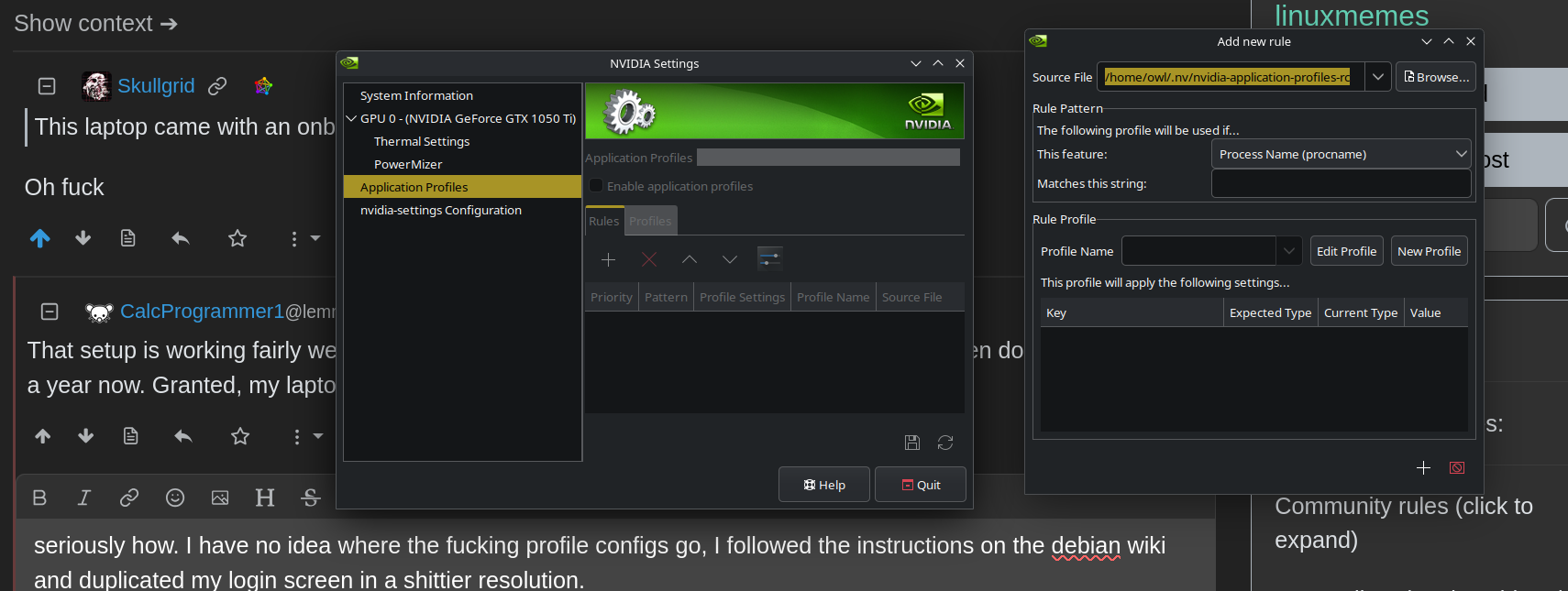
EDIT : The below doesn’t work.
I’m thinking about following these instructions to disable a pci device, but i’m scared of bricking this fucking computer (again) and wasting another weekend re-installing the os instead of working on projects
https://gist.github.com/pjobson/9e5f7349cf4f28bc82f82ea980047778
I get two fucking folders presented when I scan for the PCI folder :
lspci
00:00.0 Host bridge: Intel Corporation Xeon E3-1200 v6/7th Gen Core Processor Host Bridge/DRAM Registers (rev 05)
00:01.0 PCI bridge: Intel Corporation 6th-10th Gen Core Processor PCIe Controller (x16) (rev 05)
00:02.0 VGA compatible controller: Intel Corporation HD Graphics 630 (rev 04)
ls -la /sys/bus/pci/devices | grep 00:02.0 lrwxrwxrwx 1 root root 0 Feb 18 02:53 0000:00:02.0 -> ../../../devices/pci0000:00/0000:00:02.0 lrwxrwxrwx 1 root root 0 Feb 18 02:53 0000:02:00.0 -> ../../../devices/pci0000:00/0000:00:1c.0/0000:02:00.0EDIT :
00:1c.3 PCI bridge: Intel Corporation 100 Series/C230 Series Chipset Family PCI Express Root Port #4 (rev f1)Oh, you have NVIDIA 10 series, the worst generation of NVIDIA card. Too old to support GSP, too new for nouveau reclocking, abandoned by NVIDIA’s current drivers and stuck in boot clock hell due to signed firmware. Unfortunately the 10 series cards are just going to suck on Linux and that situation won’t improve unless a miracle happens. NVIDIA’s usefulness on modern Linux begins with the 20 series and GSP firmware. I had a 1080Ti, it was not a good experience.
Especially for Nvidia/Gaming stuff I’d recommend a distro other than Debian. I love Debian, but it’s got a very uncomfortable and tenuous relationship with the very non-free nature of Nvidia’s proprietary drivers, and Nvidia is absolute garbage at compatibility and documentation on Linux (try and install their Cuda/AI shit on the first attempt by strictly following their documentation, I dare you, and good luck even picking which version of their documentation to use because there’s about 3 different processes and they’re all wrong)
PikaOS is a gaming distro based heavily on Debian, but part of a community with all the other gaming distros like Bazzite, Nobara, etc so they share most of the latest updates and configurations, they have tools to install various versions of drivers and other performance configurations you can play with. I know “just reinstall your OS!” is probably not the thing you want to hear, but honestly, Stock, out of the box Debian is pretty close to one of the most wrong tools you can choose for this particular job. And again, that’s not Debian’s fault, Debian is wonderful, it’s just … an extremely important and powerful tool for different jobs. Taking full advantage of modern Nvidia GPU hardware and gaming on it is one of the few that it is rather poor and frustrating at.
Fun thing is , I tried bazzite, nobara and PikaOs. None of them do any better, it always overheats, it’s not even NVidia’s fault. apparantly,
Some laptops have the igpu as the dedicated driver of the display and can’t do hardware mux.
https://lemmy.world/post/43208560/22206476
And because of that, the intel 630 graphics card is always a bottleneck that causes heating problems. I gotta dig more, but at least @[email protected] gave me some more leads.
Thanks MSI! You truely are Multiple Serious Issues
I’m not sure on Debian, as Debian tends to sit on old releases of stuff for a long time. On Arch with KDE Plasma Wayland or GNOME Wayland, I just install nvidia-open-dkms and let it do its thing. Vulkan automatically uses the NVIDIA RTX 3070 in my Razer Blade 14 2021, no weird hacks or command line arguments required. Also, NVK is also quite usable, so I have set up rEFInd configs to boot with either NVIDIA driver loaded or nouveau. NVIDIA Settings is an antiquated tool and pretty useless if you’re using Wayland.
this laptop is from 2017/8 so it’s also old AF. I’m not using wayland for as long as I can, as wayland breaks my shit and leaves me mad. X11 on plasma until I upgrade the plasma package… and then we’ll see.
Wayland works much better than X11 on all of my systems, it works better for render offloading due to better synchronization and it allows for variable refresh rate and HDR. It did take NVIDIA way too long to implement decent Wayland support though.
Me after years in IT and decades of Linux:
If you need help, bother somebody else
I use Mac btw (more to the point, I use whatever you do not use).
That’s why I daily drive Haiku OS.
Mad props if you really are. 👍🏻