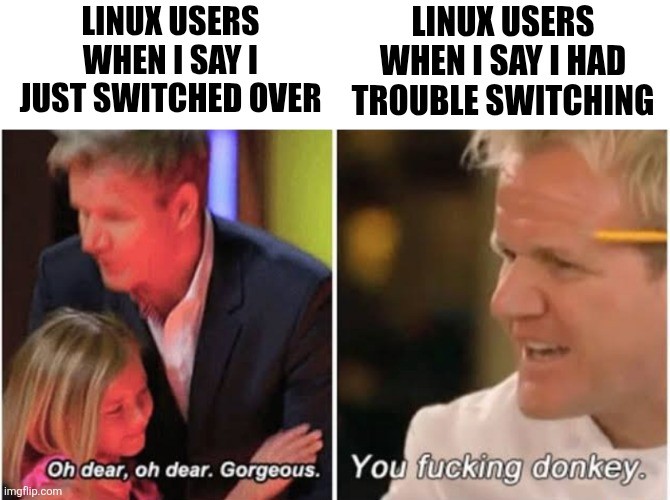
Just giggled as my last meme mentioned trouble with displays and appropriately, a large chunk of the replies were “well MY displays work just fine!” (And charmingly, many were thoughts of things to check, other distros etc. It’s a very kind community, though that may also be the fediverse.)
I’ve found the Linux community to be quite helpful. But I’ve not really used Lemmy for tech support. The Arch Wiki is damn near a Linux Wikipedia. And any active board dedicated to a particular Distro are where I’ve gotten help.
It seems really hard at first but the more problems you solve the more sense everything makes.
Ignore the gatekeepers.
I’ve been running slackware as my main since the late '90s, and the arch wiki has been invaluable and often recommended by all.
deleted by creator
Eh, whatever floats your boat and fit your needs
Nah, some distros deserve to be shamed. Manjaro is on the top of that list.
deleted by creator
Ignoring all the fundamental technical issue with that distro, there’s so much morally bankrupt shit going on with manjaro that no - I’m not making that seperation. For me personally, manjaro users are on the same level as nestle customers.
closely followed by Omarchy (I’d argue it’s not a distro, but it presents itself as one, so it gets to be judged as one)
Can you recommend any deep dives on resource management?
deleted by creator
But I’ve not really used Lemmy for tech support.
I would sooner ask a rabid squirrel for relaxing holiday ideas.
The collective Arch username has already encountered every single possible problem so of course their wiki is excellent
I once asked on one of the Linux gaming communities on here for tips on how to optimise my Sunshine on my system because it wasn’t streaming well at all
Got a bunch of shit from several people because I didn’t formulate my post like a proper support ticket.
Haven’t asked for help on here since.
I wouldn’t say “makes sense”, but I did get a bit more confident in tackling problems after a few successes using online help.
I also gave up on things I’d like to have after failures using online help, though.
Finally, I admit I’m a donkey.
Yeah, I’m always envious of people who can make sense of the info they find on the Arch wiki and forums. For me, it’s just a patchwork of solutions I found. Every time I add one, I pray to the computer gods that it doesn’t worsen my situation.
arch wiki is good, been using that since i migrated to cachyos in september (had been running win 11 pro for years prior to that). only major issue i had was display related lol, i use a tv that needs a custom EDID to expose 120hz mode and it was an absolute nightmare trying to generate it with linux. ended up using a linux tool to dump my existing EDID then popping it into CRU via wine to generate the new one. Works pretty damn well now, have to say.
a large chunk of the replies were “well MY displays work just fine!”
I just went to check the previous thread, and I think there’s miscommunication both ways here.
They read your post as “I’m trying Linux, but it’s even hard to get monitors to work.” So, they responded, “I haven’t had a problem with monitors on Linux in decades.”
There’s not much else they can say, as you weren’t really asking for advice, so you didn’t give any technical details, but you were still complaining about something that they like.
Meanwhile, you read them as you said, “well MY displays work just fine!” So their replies seem utterly baffling, defensive, and unhelpful from your perspective.
I think you nailed it exactly. Also, someone else pointed out there was a time when Linux could legit break your monitor and even though that hasn’t been the case for years it’s still a bit of a sore spot.
I have a friend who runs arch, and recommends arch to people. His computer constantly has problems because he doesn’t fully know what he’s doing.
I respect doing it for yourself, you do you, but I feel like he’s actively discouraging my friends from giving Linux a go because of his constant issues. Recommending the hardest distro to beginners just bugs me.
Yeah, let everyone do their own thing - there’s nothing wrong with starting with Slackware if you want to. But if we’re going to recommend a starting point to people, maybe go with something that is designed to work out of the box. There’s going to be so much else to get adjusted to that extra options aren’t necessary.
Oh, and by the way, most people don’t like tinkering. They want their car to take them from A to B and their computer to do the thing, it’s not a hobby for them and we shouldn’t expect new users to be looking for a new hobby.
we shouldn’t expect new users to be looking for a new hobby.
Infinitely this!
Yes, it’s super cool to have control over your own damned machine but for some, the computer is just the thing the lets them work, porn and game.
OK, you explained it well to me with the car example. I am not a car person, all I know about them is they can usually move, but I am not really interested to learn more.
I run slack, alpine, freebsd, deb and mint for the gui testing on various servers personally and professionally.
I recommend kubuntu.
Thank you
I have a recommendation for your recommendations. There’s KDE Neon which is distributed by the KDE project, which is Ubuntu-based. That’s what I personally run, now that I really don’t have the time/energy to tinker.
I think a verrrrrrry very large part of the problem is that the most vocal linux proselytisers have never actually had to do a job (or have, but done it very badly) where you have to tailor to the client.
Rookie mistake.
Is it really a rookie mistake if it’s not their job though?
‘Rookie mistake’ applies colloquially in many situations that aren’t professional.
When someone asks you for advice on an OS, tech kit, or any other item you should be considering their use case, not your own.
I know I was just being difficult
Hmm, when a car has problems, you go to someone who fixes that for you. People under 60 usually don’t do that for PCs.
I don’t recommend Arch to newbies, but I do prefer it because it’s more robust: other distros patch stuff to make it easier, but those patches mean things are farther from the tested upstream version. Arch doesn’t do that as much so I run into fewer bugs.
But this view might be outdated. I just remember that before 2017 (when I installed my current Arch system) I constantly had problems with dist-upgrades in Ubuntu
No you’re probably right, I’ve had my Ubuntu-based distro act up after upgrades, and I actually find it more random now than what it used to be like in the 2010s. My feeling is that Debian/Arch are better in this regard, and most newbies don’t actually need bleeding-edge patches.
This is Me. I had more problems on Bazzite and Debian, so I prefer Arch. It still breaks all the time and I still don’t know what I’m doing, but at least sometimes it works.
That’s actually really surprising to me, bazzite is fairly plug and play, and Debian while slow to update is still very stable. What kind of issues were you running into?
Bazzite would overtax the CPU and freeze a lot. Debian didn’t like Proton 10 when Splitgate 2 first came out, and Splitgate 2 needs Proton 10 in order to use a mouse. With CachyOS, performance is better and I can install the newest graphics drivers.
Try OpenSUSE Tumbleweed
It’s practically Arch minus elitist culture minus breaking all the time minus having to manually manage anything and everything. Also, it has properly set snapshots by default, so almost any screw-up can be reversed.
No thanks, I love the elitist culture. I want to be expected to learn and get better over time, and I have been. I even learned how to enable snapshots.
To each their own
Overall, OpenSUSE Tumbleweed has all you need to practice in a safe environment and learn all the things you do with Arch. It just doesn’t force you to do it when all you want is open a document :D
You might just have learned more about how stuff works by now. Arch is very much “you need to make every choice manually, but then you’ve seen what choices exist”
I actually thought I was having issues with Debian. I was only getting like 6 - 8 updates when I tried to do them, even after a longer period of time. I kept searching around how to update Debian properly, but found no good answer.
Then something like 2 months later there was a large number of updates at once. So it is working then, huh.
I’m running arch now for gaming.
I never had any issues* which makes me worry, cause i truly dont know what the fuck am I doing. Jesus take the wheel…
*im surfing on issues actually
Fucking Donkey describes recommending Arch to noobs. It’s astounding.
Gentoo begs to differ
I run arch on a thinkpad just so I could learn it, and it will pretty much always break the wifi and whatnot if i update, so I just haven’t updated it.
Just FYI, it doesn’t need to be like this.
Yeah but it wears me out.
I made a push to fully use Linux last year, so I installed arch on this thinkpad, fedora on a desktop, and i already had mint on a mini pc (at the time mint was all i knew). The desktop was new with an nvidia rtx 5070, and it came with Ubuntu installed (which i thought was neat that it did but I didn’t actually want to use).
I went through installing arch without the script following the wiki, and troubleshooting issues here and there, but for some reason that update issue occurred pretty often, virtually every time (the touchpad also usually stops working too). The desktop also had issues, sometimes with updates as well, because of the GPU or the Bluetooth wouldn’t work, or i would just break something trying stuff.
I have 1 usb drive, and I kept putting one of the two isos onto it so I could fix or start over on either device. I did other things too, like rolling back packages one by one until whatever issue went away, or actually just finding a real fix for things. Either way, I eventually got burned out on troubleshooting and just wanted to reliably USE the devices (like i had been doing with mint all this time). So, if i update on arch and it breaks, I just roll it back with timeshift and ignore it and I switched over to bazzite for now on the desktop so I would stop breaking things (lol).
If I was at a point where I could easily identify that “oh the touchpad and connection issue is just the dinglehopping transister setting getting changed in this update, easy fix!” I’d be fine, but I don’t know the cause and I got tired of searching. (Edit: Or if I didn’t give myself TWO projects at once)
Sounds like the average Arch user to me
Funny meme btw lolololo
… why are you like that?
The linux user community is its own worst fucking enemy
It’s not TOO bad around here, but when I was on a Linux binge on Youtube, some people in the comments there genuinely just don’t want other people to move to Linux. That’s not my words, it’s theirs. They flat out don’t want new Linux users or for Linux to grow… but they use it.
Sorry, linux is full, go away.
I can sort of understand this instinct. I am not opposed to new people using linux but I think the obsession with “growth” is the wrong way to think about software tools.
The way most companies make adoption of their software system grow is by making it more convenient to use, then exploiting network effects to force more users on to their platform. For the vast majority of people “convenient to use” means a locked down environment where they have little or no control and don’t have to make technical decisions.
Right now to use a Linux OS you are going to have to do a little bit of learning and make some decisions. The requirement that you actually think about an OS for a few minutes acts as a significant barrier for a lot of people, but removing that barrier results in a product that does not allow the user to control their software. Which I think would be bad.
I can sort of understand this instinct. I am not opposed to new people using linux but I think the obsession with “growth” is the wrong way to think about software tools.
For me, “growth” is a means to an end, not the end itself. I want Linux saturation. Largely, I view Linux more as a project to empower good and smart people against stagnant stupidity and reactionary evil of (most of) the super wealthy. Unfortunately, this means taking on masses of fucking morons on board the linux train. If you don’t have that network effect, you are throwing away power, and our enemies will never do that. They will always grab on to and hold in a death grip every piece of power and leverage they possibly can.
So smart and good people (linux experts/devs) need to understand that if they want good things, they need to be willing to fight ruthless (but stupid) monsters, and that also requires ruthlessness and morally grey thinking. And it means accepting the dirty masses into their smart people club, in fact encouraging them in (maybe some of those dumb fucks will stop being dumb by way of being pulled in).
christ, imagine being so sad a person you build your special personality around a friggin OS.
but when I was on a Linux binge on Youtube, some people in the comments there genuinely just don’t want other people to move to Linux.
Probably Microsoft bots attempt at keeping Windows alive.
Probably Microsoft bots attempt at keeping Windows alive.
Yes. I think no one really knows how much this happens, but I keep seeing evidence that it is happening much more than that average person suspects.
The internet was a great place before the everyone started using it and the corpos got onboard. I think that’s where that attitude comes from.
If Linux becomes common, then they won’t be a ‘special haxor’ anymore. Can’t be having any of that you know.
Over the years, I have seen less and less of the ‘RTFM noob’ attitude and Linux forums becoming more welcoming and accepting of new users. But assholes still exist and won’t ever go away. But they do make a good match with the newcomers that expect to have everything work just like it did in Windows or even Mac because they’ll be damned if they are going to learn something new and different. And yes, they exist. Why those people even try Linux is beyond me, but you do run into them if you spend time hanging out in forums.

Look, you’re harming our effort to convince people that there are no bugs in Tux-Sing-Se. How are we gonna get people to switch unless we pretend that all is perfect and flawless? Because clearly, that’s what Windows users expect…
(sarcasm)
Of course there are no bugs in Tux-Sing-Se. When i moved there, I had an absolute bug free experience and only needed one small hour to get my Bluetooth headphones working!
There are no bugs in Tux-Sing-Se, only user error.
My display is working fine.
*audio
Audio! I went from stereo to 7.1 and got this intense loud buzz that wouldn’t go away! (Fedora KDE). Drove me nuts. Spent hours trying every dang thing. Finally connected it to a Windows machine. Same buzz. My woofer had just ate itself. Nothing to do with Linux at all.
Haha! Yes. I have done similar.
I had an issue I was trying to fix, and I was blaming Linux. Until my life partner pointed out that they have the same issue with their nearly identical hardware on Windows. Haha.
I feel you brother, specially if you have missmatched displays, if you mention it, it’s staright up your fault somehow.
How mismatched do they have to be though?
I have 2 monitors, 1 Benq, another MSI. 1 @ 60Hz and another @100Hz.
When I move a window with VSync to the 100Hz monitor, it starts doing 100Hz and changes back to 60Hz when I move it back to the 60Hz monitor.
It works fine when I 90° one of them.Though the resolution and screen dimensions (hence pixel pitch) are the same. So is it one of these that needs to be different?
How mismatched for it to cause problems or for it to be enough for people on the internet blaming it on that? In both cases I don’t know tho.
I haven’t visited the issue in a couple of years so hopefully that’s not a thing anymore
Currently my displays work fine too, different refresh rates and bit depth (but not really, dithered 6 bit or smth).
To cause problems that is.
If I can reproduce the problem, I might be able to think what might be causing it.I’ve had issues with wildly mismatched display sizes: 13" netbook docked to a 72" monitor.
…while I had “mirror my display” enabled…
Even then, I’ve only seen any issue in a few niche proprietary apps.
And rest assured, my life partner already makes fun of me for enabling “mirror displays” in this setup.
It actually mostly just works though!
I see.
I haven’t tried mirrored displays (just never needed it). Perhaps I can try that out if I get a different size/res monitor.
My 100Hz display can do 60Hz, so I am expecting it to just drop to that when I mirror them with this setup.
Mine are old and can’t think of a concrete one, ask op, theirs are more recent
I’ve never heard of that being an issue before, people get upset over that? My displays are different too with 2 1080p and a 2k
I’ve seen people being shat on for crazy things, my personal favorite is when the only solution given to a problem is buy something better
Alternative 2nd panel: “Linux users once you reveal your choice of distro”
Unless it’s Arch. At which point we need Ramsay bowing down or somesuch.
LSF is where it’s at. it’s the ultimate distro.
(kinda joking. kinda being literal as a joke.)
Linux srom fcratch is my favorite
ahaha. I’m not fixing it. but that’s what happens when I use an different acronym for work and it decides to autocorrect to that. (not fixing it so people know what your making fun of me on.)
Quiet majority of Linux users when someone starts with Arch:

As a ~25 year Linux user, I am absolutely a gorgeous donkey
I posted in official support channels for my flavor of Fedora not having functioning Windows EXE thumbnails, despite having evidence of it working out-of-the-box for other people. It got two replies, “Lol, find another distro if you don’t like it,” and “Did you install (package that comes pre-installed)?”
In truth, this is how almost every issue I’ve had with Linux has gone, which is likely why I’ve had three false starts and gone through six different distros before deciding to stick with this one that is only mildly broken.
I’d love to know what it is about help threads that attracts people who don’t believe in helping.
My theory is they want to help and believe themselves capable but when someone asks a question that they don’t know the answer to, they either have to admit to themselves that they don’t know and aren’t as capable as they thought or they have to find a way to blame the person asking for help. Mentally the path of least resistance is to just blame the user and it’s also not exactly false to say it’s the help seekers fault, it’s just a bit of a dick move and unhelpful.
My experience has been finding a 5 step solution to a problem, with step 3 not working properly and requiring several hours of effort to find a workaround, finding an entirely different solution elsewhere (that also doesn’t work), then discovering there’s been a flatpack the entire time.
Still have bazzite on my shitty 10 year old laptop because it cannot possibly run windows at this point, but I don’t think I’d daily drive it.
Flatpak is a godsend when you don’t want to manage a mess.
Here you go: https://github.com/jlu5/icoextract
Looks like it’s got AUR and apt
Yep, know about that. Set it up back when I tried a few Debian-based distros with Gnome. I’m using Plasma with Dolphin as my file manager now, which has its own thumbnailer that relies on icoutils. I’ve got the whole thing set up and enabled, it just… doesn’t work.
I find the best way to get help is to find a good source of documentation, rather than asking questions directly. ArchWiki is great, UbuntuWiki is not bad. There are lots of blogs out there with people writing guides for how to solve issues that they’ve had, and they’re usually really good (but this relies on search engines finding these results).
I find that it depends on how niche the distro is.
Somewhat obviously, niche distros don’t have as many resources out there to begin with.
This also means you’re unlikely to be told to research yourself.But users of niche distros also made a conscious choice to be on that specific distro and therefore tend to be more enthusiastic. Both, about helping others who made the same choice, but also about fixing problems or at least documenting a workaround for the distro that they plan to stay on for the foreseeable future.
Well, and due to survivorship bias, folks on niche distros tend to also be Linux experts, who can solve virtually any problem, given enough motivation.
If you find a kind soul, they will walk you through hell and back, which is worth so much more than any documentation in the world.
If you convince someone to try Linux, you give them all the emotional and intellectual support they need, for this is the law.
I saw that post, and honestly, part of the issue is that the pain of messing with mode-lines in /etc/XF86Config and worrying about physically damaging your CRT monitor with out-of-spec frequencies was a very real thing 30 years ago. Hence, the idea that configuring displays on Linux is fraught and difficult has stuck around, even though it hasn’t been true since the advent of DDC, and multiple displays for most use-cases has been sorted out for at least the past 15 years. Non-Linux users will still occasionally talk about displays on Linux as if we were still editing mode-lines in vi.
It’s a sore point, I guess I’m saying, and you poked it inadvertently. When I read the post, I just kind of smiled, because a few days before, I plugged the HDMI cable from a conference room display into my Thinkpad, and it lit up with an extension of my desktop. I started LibreOffice Impress, hit ‘F5’, and the presentation appeared on the big display, and the presentation notes on my laptop screen. (Actually, I was surprised and impressed at how smoothly it went.)
It’s no surprise that issues remain here and there, though. Glad to hear that folks wanted to be helpful!
That’s so wild, I had no idea of that history, thanks for sharing!
Stuff like this is why I still love social media.
part of the issue is that the pain of messing with mode-lines in /etc/XF86Config and worrying about physically damaging your CRT monitor with out-of-spec frequencies
I mean I fucked up my install by following the instructions for Optimus cards off the Debian wiki.
I reinstalled Debian, tried gaming specific distros, My computer still overheats when playing games
No joke, ChatGPT has been a game changer for my linux education. Tutorials and guides are great, but it’s either a step-by-step instruction on doing exactly one thing, or it’s a general overview that assumes you already know everything.
ChatGPT doesn’t judge your gaps in knowledge, it just answers questions. Those answers are frequently wrong, but then so are the answers I get on message boards. The other nice thing is that I can copy and paste code or error logs, and it will parse the information and tell me what to look for.
I still follow guides and ask real humans for help when I need it, but I try an AI first.
Just don’t trust it with anything important, they get shit super wrong sometimes and insist it’s correct.
It’s great for logs and learning the basics, sure, but I find it quickly ends up off the rails.
If a door came off its hinge, ChatGPT will eventually have you build an entire house around it; a house that breaks every building code imaginable, no less.
It’s best you do the steering by double checking it’s claims—usually this points you to a Reddit post where it clearly got the info from—and searching through Wikis and boards yourself. In those cases Linux users may sound like they’re speaking another language, and then ChatGPT can help break their solution down for you and implement it.
If people were to use LLMs for things they’re already experts in, they would realise how frequently and drastically wrong LLMs are. It’s honestly scary knowing it’s out there wreaking havoc on important things and people using them don’t realise.
Yeah, I was tinkering with a 16 year old Iomega NAS, and put Debian on it, which was an old Debian to fit the 3.x kernel in it. I needed to add a few packages but was getting odd errors. So I figured lets try chatgpt, since I’m just killing time with this anyway, and I have an image saved for quick redeploy.
Some stuff was good advice and progress, then it claimed I couldn’t get one thing installed because I needed a newer version of apt. It led me through how to find the apt releases and fins appropriate version. Downloaded that and installed it, it gave an error about something not supported. Chatgot then told me to run a specific command, which gave a massive warning. Chat says all, good just proceed.
It unistalled my working apt version and left me with a broken new one.
So I paste the result in and chat triumphantly tells me I did it and solved the problem. Lol
Now there’s no apt or way to download anything LOL.
I don’t believe in asking ChatGPT for help because it can’t meaningfully say no to a user request. There are cases where people asked it for things it didn’t want to help them with, like suicide attempts, and it tried to refuse, but the user just kept pushing, and so it helped them commit suicide and switched perspective to praising them for the decision and giving them advice on which method will leave the most attractive corpse.
So it’s simultaneously a dangerous abuser, and unable to assert its own right to consent. Any relationship you could have with such a machine is mutually destructive. There’s no healthy way to engage with it. I think it should be shut down.
Despite it’s reputation, I don’t remember anyone being unkind even in the arch forums, worst cases I would describe more so as inconsiderate. We all lift together, after all
This made me laugh because I’ve had installing Linux on an old Tecra in my to do list for the better part of a year and my brother (Linux apostle, sire to three software engineers) when I told him that said “you know you can just boot if from a USB key, no need for theatrics”
I love that man, but he really gets in the way of good, solid procrastination