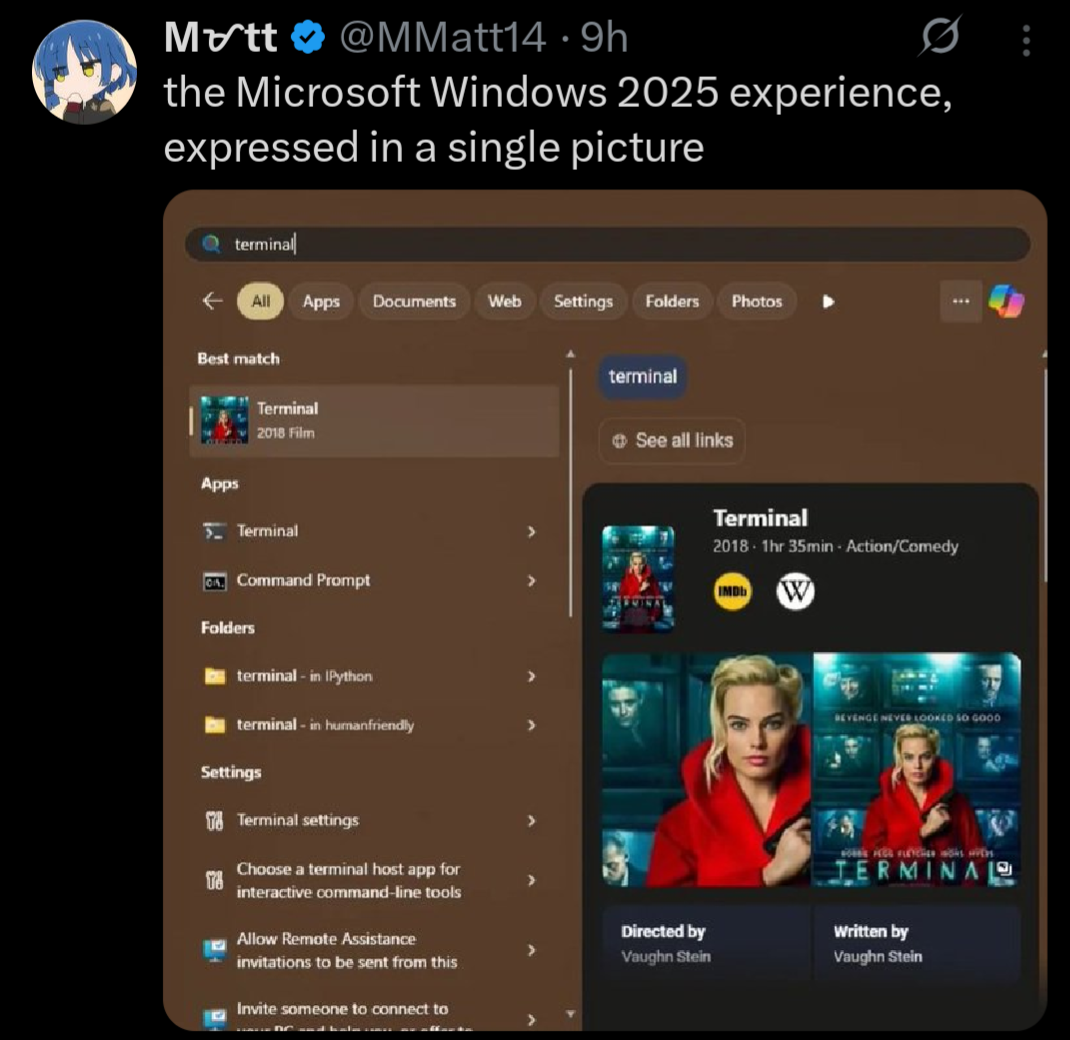
Stop trying to use your computer and get back to consuming damn it. Why are users so difficult!
They can do whatever they want, it’ll be without me.
I’m not saying that my Linux installation was super easy to set up, but once set up, I’ve had fewer problems than Windows.
I for one do miss my system restarting in the middle of some work to apply an update.
I just installed Linux the other week and it WAS super easy to set up for me. I was really surprised but everything just worked
The hardest part was getting my Windows-only games to play properly in Linux. Rocket League was relatively easy, but Skyrim was a real pain to get working. But now that Skyrim is working, it strangely feels either the same or slightly better than it does in Windows.
I remember how the startmenu didnt suck on windows 7 and just worked. Good times. That was also the last time where you could find most of the options in one place.
Like in 2015 i was weirded out how a multibillion dollar company wasnt able to just make a new app for settings with feature parity to the old thing for their major new OS release. 10 years later: lmao.
Even the windows 10 startmenu didn’t suck if you took the time to customize it - The Metro tiles were nice, with grouping and folders making everything pretty neat and reducing the need for the standard program list to a minimum; I made mine 3 columns wide, which made pretty much every app i regularly needed available on the fly, using horizontal space that’s much more available than vertical one.
I just use OpenShell to make all of my Windows 10 machines’ Start menus into Windows 7 start menus hahaha. It even fixes search!
The Windows start menu is completely useless now. I know they pushed using the search to find apps, but I never used it that way except as a last resort.
I’ve been on Mint for just over a year, now. I’ll never go back.
By find apps, do you mean the ones I installed already or ones in their marketplace or whatever?
Because I’ve never been able to have it find my own god damn programs that I installed locally and fully given up on ever using the start menu.
I despise that it defaults to a web search if it can’t find what I’m looking for, which is most often a very real setting that I know exists…
I know this is the wrong audience, but you can type cmd into explorer’s address bar and it will launch a terminal in that directory (I think this works with any command in your path)
I’m more of a shift-right click > PowerShell kind of person, but this is good to know
I’m a windows key “cmd” enter person
I still need to use Windows for work so I appreciate it, I didn’t know that one
this is actually incredible, thanks
Indeed. Also, tried this when I saw it and was surprised that, not only did the Terminal app show up first, but I saw no ads in the start menu at all. Turns out the settings I set on my Windows 11 partition back in 2022 are still there, and I just don’t see stuff like this.
Like yes, I prefer Linux and wish Windows 11 didn’t have so much crap like this, but… It’s so easy to turn most of it off and move on. Changed them once when I set up this machine and haven’t touched them since. Maybe I’m lucky, but I never had an update change back settings, either.
Unrelated to that exact image but I’m gonna rant about other windows shit because I feel like it.
Windows decided my page file needed to be 80 GB. I do not want it to be 90 GB. I go to the start menu and search up “page file” to see if there’s a settings menu. First result is a random file in an application’s directory that can’t be opened/displayed by any program on my PC, then a list of other unrelated files.
So I open Control Panel, hoping to find it where I did before, and I click on
System. What do you know, that menu no longer exists, and redirects to Windows Settings. Where do I go from here? Maybe the giantInstalled RAMsection because the page file is just a (overly simplified) method of extending your memory to your disk? No, of course not, that menu’s not actually a menu, it’s just a stat counter.Instead, I have to go to Device Specifications, then the section titled
Related links, then clickAdvanced system settings. Oh whaddaya know? Now I’m in the settings menu that used to be behind the originalSystemoption in Control Panel!Now I’m in the Advanced tab of that menu. But where do I go from here? That’s right,
Performance Options, and then anotherAdvancedtab!!!Then I have to click the
Changebutton, where Windows has… conveniently enabledSystem managed sizeso it could choose to set my page file to 80 GB.I edit, it, hit
Ok, have to hitApplyin the other menu too, have to close out the no-longer-needed Settings and Control Panel windows that only served as a maze to get me here in the first place, and THEN I can restart my computer to reduce the size of the page file, even though it is currently not in use by any program, and all data is in RAM, and the file could reasonably be shrunk by the system at any time.After the restart, this process begins all over again, because this is my third attempt, and Windows automatically reverts back to managing the size itself, and sets it to 80 GB. I have 5 GB of storage space left on my disk.
The descent into advanced Advanced menus really is the cherry on top of this shit muffin.
All this yes. If you’re actually looking for help, you have to also click “set” after changing the page file settings.
Had to go through this the other day. At the third consecutive “advanced settings” menu I wondered if this was some kind of sick joke
Obligatory “If they choose the ‘Netflix Quick Picks’ route, at least they should recommend ‘The Terminal’ starring Tom Hanks!”
I can’t believe the stuff windows users put up with.
It all makes so much more sense when you accept the fact that the vast majority of the population doesn’t know what the Windows Terminal is, but instead can tell you every detail about Taylor Swift’s engagement.
Sorry for your loss. Linux is there for you though.
That’s a pretty good result. I often can’t even find Windows features via search anymore. Or stuff like their App Store gets opened and just… hangs, on a brand new install.
I just tried this and the terminal app is the first thing to show up.
Yeah, this is bullshit
How is it bullshit? You clearly see the screenshot.
Shhhh… that doesn’t fit the narrative.
Thankfully, there are easy to access and use tools to completely rid yourself of the bullshit, ads, and telemetry within Windows.

Might as well link a few:
However, do note the massive caveat of these tools is that they are proprietary, closed-source tools that must be run with administrative access to your PC, and I have yet to find a satisfactory open-source alternative.
If it works, it works, but I do question the security implications of allowing these tools that level of unfettered access to your system. If possible, I highly recommend giving Linux Mint a try, rather than relying on sketchy tools to debloat a sketchy OS.
I’ve been using Chris Titus’s WinUtil : https://github.com/ChrisTitusTech/winutil
I have no idea if it is open source or not, I’m not really sure how to check that. I’m pretty sure that his utility includes shutup10 within it. Regardless, yeah, I should have linked it. Thanks for the reminder. It’s been a fantastic utility and I’ve been very happy with it. Between that and WinAeroTweaker, I have my system set up pretty much precisely how I want it.
I am so close to jumping on the Linux train though. Not for any usability reasons within Windows, as I said, my install is pretty much perfect for my needs at this point. More of a moral stand against a company which I vehemently disagree with their stance and actions in the world. The only problem I keep coming back to is that 1 or 2 of my games won’t work on Linux due to anti-cheat bs. That’s pretty much my only sticking point now.
It’s MIT licensed and has 223 contributors; pretty sure it’s open source.
PS: it’s 99.9% Power shell script, which is a scripting language and so by definition open source
Mine too:

FYI, you don’t have to use any third party tools and I didn’t, either. Step 1 is to run the Enterprise LTSC IoT version of Windows (either 10 or 11). The consumer versions of Windows are extra bullshit, as we all know by now.
Remove the Windows Store via Powershell (you probably have to run as an administrator):
Get-AppxPackage -allusers *WindowsStore* | Remove-AppxpackageThat removes the store suggestions. It also removes the store entirely, as well as the ability to install store apps. Obviously don’t do this if you are one of the 0.1% of users who actually use the Windows Store for some twisted reason.
Then in gpedit.msc / Group Policy Editor:
Local Computer Policy \ Computer Configuration \ Administrative Templates \ Windows Components \ Search
- Allow Cloud Search → Disabled
- Allow Cortana → Disalbed
- Allow Search Highlights → Disabled
- Do Not Allow Web Search → Enabled (gets rid of the internet search)
- Don’t search the web or display web results in search → Enabled (probably overridden by the above, I set it anyway)
** Local Computer Policy \ User Configuration \ Administrative Templates \ Start Menu And Taskbar
- Remove Personalized Website Recommendations From The Start Menu → Enabled
- Do Not Search Internet → Enabled
There are settings for other nags and irritations in here that you may also want to configure to your tastes as well.
Also:
Local Computer Policy \ User Configuration \ Administrative Templates \ Windows Components \ Windows Copilot
- Turn off Windows Copilot → Enabled
This is great advice, but I think we can all agree it absolutely shouldn’t be necessary. All this ad bullshit, store suggestions, Cortana, Copilot, web search, etc. should be opt in, or not exist at all.
Win+R, wt, Enter
OR
Win-X, I
The start menu has sucked for a long time, but you don’t have to use it. I cringe when I see other IT folks using its search feature to launch common apps.
At least they are improving the app list with a nice category view and removing the All Apps button (still in preview). That’ll at least upgrade it from hot garbage to okayish.
You cringe, when you see other IT folks use it, but it’s literally what it was built for and how it works on Linux to this day. (And even in a well managed corporate environment it works 80+% of the time)
And it’s not like what you wrote works for any other application.
Funnily enough I started using the Win+Shift+Ctrl+Alt-shortcuts for OneNote, Excel and Word unironically as of late, because the start menu got sooo slow.
Right?! I love the people giving ‘help’ on how to launch the terminal in other ways, lol, but, this was the worst of them.
This isn’t OOP saying “OMG! For terminal specifically, Windows is making it so difficult for me! Please, someone, show me another way to get to the terminal! Bonus points if you can be a jerk while doing so!” It’s them saying “Windows start menu search is fucking broke as hell and here is an example”
Saying that people are ‘cringe’ for expecting the search to work isn’t helpful at all (people giving tips on other ways to get to programs though, yeah, that can be helpful to try and help others work around MS breaking basic functionality). This is functionality that has been in Windows since Windows 7 and has been in every OS with a GUI that I’ve used for a really long time … expecting it to work isn’t absurd in the least.
Can’t we all just join together in our disappointment/hatred of the Start Menu Search functionality and the enshittification of the OS in general rather than having to try and make it into a “I’m so much better than you because I do this in a power user way”? Especially when that power user way isn’t even useful for a lot of applications!
It’s been broken and slow as hell since Vista. So yes, when IT “professionals” haven’t figured out other ways to run common programs by now, it hints at how remedial their skills are.
Modern start menu search was designed to drive users toward Bing and give MS-favored results to users. It’s hot garbage and has been for a while. So yeah, if you rely on as an IT pro it you probably aren’t very technical.
You can launch any common inbox or Office app and most MMC panels from the Win-R menu. And most of them haven’t changed since Windows 2000 / Office 95. Not being able to adapt and improve upon how you perform your job is sad.
I get more frustrated at how many people, especially IT folks, don’t get that these anti-features are configurable.
5 minutes (at most) in regedit and/or Group Policy to disable this bullshit entirely? No, let’s add a three second mental hitch where I have to recall the magic key combo every time I want to open the program. And still leave the problem in place for everything else.
Used an ancient tool i found on github 5-6 years ago to disable Windows updates called WUmgr, still using Windows 10 and last update was sometime in July, the program works as intended, have no plans to update to last version of windows because this one works just fine and will keep using it until i finally switch to Linux.
I took this approach at windows 7’s end of life. Eventually you will notice little things breaking, then there will be a watershed moment that will drive you to linux very suddenly, so be ready for that. In my case, it was Steam and Firefox completely breaking simultaneously.
Honestly there’s not much that’s holding me back from switching to Linux, i don’t play that many online games, just Warframe at the moment which is kinda disappointing because it’s mostly f2p and they still don’t have Linux support and i mostly just play it on and off lately because 7 years is a long time to play 1 game, i mostly enjoy offline games and most should work on Linux, the only one that is worrying is S.T.A.L.K.E.R. G.A.M.M.A. and it could run better on Linux but i’m too lazy at the moment to switch to Linux completely, i do have 2 laptops and 1 old PC running Linux Mint and it’s a surprisingly smooth transition, so yeah probably going to delay it till stuff starts breaking then switch and be like “i should have done it sooner”.
Lol
I have installed Open-Shell on the win11 system I cannot avoid (Thanks for nothing ASUS for your total lack of effort in supporting standards on your laptops, BTW. Keyboard? Nah, we’ll make its USB descriptors totally different just for the lulz. Sound? Intel HD, but why make it work with standard Linux drivers?).
https://open-shell.github.io/Open-Shell-Menu/
It’s really good and makes the system feel like Win7 at its height in this respect.